エクスプローラーの空白部分のコンテキストメニューへ「ファイルを開く」を追加
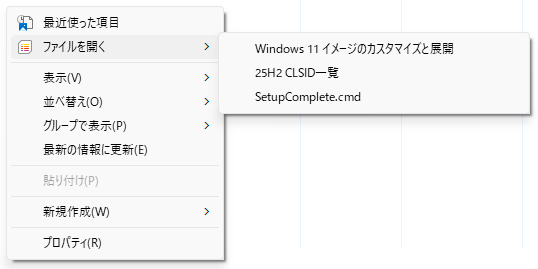
エクスプローラーやデスクトップアイコンはそのままに、よく使うファイルを開く方法としてこういうのもありかなと・・・
これしきの事にわざわざツールを使うのも嫌なので、これでしばらく使い勝手を試してみようと思う。
改善案、提案などがありましたら、遠慮なくコメントよろしくお願いします。
- = - = - = - = - = - = - = - = - = - = - = - = - = - = - = - = - = - = - = - = - = - = - = - = - = - = -
Windows Registry Editor Version 5.00
[HKEY_CLASSES_ROOT\directory\background\shell\OpenFile]
@=""
"Position"="Top"
"icon"="imageres.dll,-8314"
"SubCommands"=""
"MUIVerb"="ファイルを開く"
"SeparatorAfter"=dword:00000001
[HKEY_CLASSES_ROOT\directory\background\shell\OpenFile\Shell\file1]
@="Windows 11 イメージのカスタマイズと展開"
[HKEY_CLASSES_ROOT\directory\background\shell\OpenFile\Shell\file1\command]
@="G:\\Tools\\Hidemaru64\\Hidemaru.exe \"J:\\ISO\\Windows 11 イメージのカスタマイズと展開.txt\""
[HKEY_CLASSES_ROOT\directory\background\shell\OpenFile\Shell\file2]
@="25H2 CLSID一覧"
[HKEY_CLASSES_ROOT\directory\background\shell\OpenFile\Shell\file2\command]
@="G:\\Tools\\Cassava\\Cassava.exe \"G:\\Documents\\Tips\\Windows-CLSID\\25H2-CLSID.csv\""
[HKEY_CLASSES_ROOT\directory\background\shell\OpenFile\Shell\file3]
@="SetupComplete.cmd"
[HKEY_CLASSES_ROOT\directory\background\shell\OpenFile\Shell\file3\command]
@="G:\\Tools\\Hidemaru64\\Hidemaru.exe \"H:\\Custom-ISO\\Custom-Scripts\\Scripts\\SetupComplete.cmd\""
[HKEY_CLASSES_ROOT\directory\background\shell\Recent]
@="最近使った項目"
"icon"="imageres.dll,-117"
"Position"="top"
[HKEY_CLASSES_ROOT\directory\background\shell\Recent\command]
@="explorer.exe shell:Recent"
なんか寂しいので「最近使った項目」も追加してみました。
* PC が選択された時の空白部分には表示されません。
PC は仮想フォルダーなので通常の方法では無理っぽい。
追加できた方は報告よろしくお願いします。
- = - = - = - = - = - = - = - = - = - = - = - = - = - = - = - = - = - = - = - = - = - = - = - = - = - = -
デスクトップ版

Windows Registry Editor Version 5.00
[HKEY_CLASSES_ROOT\DesktopBackground\Shell\OpenFile]
@=""
"Position"="Top"
"icon"="imageres.dll,-8314"
"SubCommands"=""
"MUIVerb"="ファイルを開く"
"SeparatorAfter"=dword:00000001
[HKEY_CLASSES_ROOT\DesktopBackground\Shell\OpenFile\Shell\file1]
@="Windows 11 イメージのカスタマイズと展開"
[HKEY_CLASSES_ROOT\DesktopBackground\Shell\OpenFile\Shell\file1\command]
@="G:\\Tools\\Hidemaru64\\Hidemaru.exe \"J:\\ISO\\Windows 11\\Windows 11 イメージのカスタマイズと展開.txt\""
[HKEY_CLASSES_ROOT\DesktopBackground\Shell\OpenFile\Shell\file2]
@="25H2 CLSID一覧"
[HKEY_CLASSES_ROOT\DesktopBackground\Shell\OpenFile\Shell\file2\command]
@="G:\\Tools\\Cassava\\Cassava.exe \"G:\\Documents\\Tips\\Windows-CLSID\\25H2-CLSID.csv\""
[HKEY_CLASSES_ROOT\DesktopBackground\Shell\OpenFile\Shell\file3]
@="SetupComplete.cmd"
[HKEY_CLASSES_ROOT\DesktopBackground\Shell\OpenFile\Shell\file3\command]
@="G:\\Tools\\Hidemaru64\\Hidemaru.exe \"H:\\Custom-ISO\\Custom-Scripts\\Scripts\\SetupComplete.cmd\""
[HKEY_CLASSES_ROOT\DesktopBackground\Shell\Recent]
@="最近使った項目"
"icon"="imageres.dll,-117"
"Position"="top"
[HKEY_CLASSES_ROOT\DesktopBackground\Shell\Recent\command]
@="explorer.exe shell:Recent"
